HBO Max Account Sharing: How Do I Share HBO Max on Spliiit ?



HBO Max account sharing is evolving: in Europe, the "Additional Subscriber " option is rolling out first in Spain and the Netherlands. This plan allows you to split the cost of a subscription with someone living in a different household, while giving them their own HBO Max account.
Key points to remember
- Sharing HBO Max on Spliiit works through the official " Additional Subscriber" option.
- Each eligible subscription allows you to add one additional subscriber for a monthly fee.
- Each co-subscriber has their own HBO Max account and login credentials.
- An existing adult profile can be transferred to preserve viewing history and preferences.
- Spliiit connects property owners with co-tenants and makes it easier to manage cost-sharing.
How does HBO Max account sharing work on Spliiit ?
Sharing is based on two complementary services:
- HBO Max creates the additional subscriber slot and sends the invitation.
- Spliiit connects the Owner with the co-subscriber, and then facilitates the management of participation.
Owner s do not share their HBO Max passwords. Co-subscribers receive a personal link and create their own login credentials.
⚠️ Before you begin, make sure your subscription is purchased directly from HBO Max. Subscriptions billed by partners or included in bundles are not compatible with the Additional Subscriber option.
Spliiit is a subscription-sharing platform that helps users split the cost. Access is set up and managed directly within HBO Max using the invitation provided for the additional subscriber.
Which HBO Max plans can be shared?
The "Additional Subscriber" option is available only for eligible subscriptions billed directly by HBO Max.
- Subscription Type|Additional Subscribers Allowed|Number of Seats
- Compatible HBO Max subscription, billed directly|Yes|1 seat (optional)
- Subscription billed by Apple or Google|No|None
- Subscription billed by a TV, mobile, or Internet provider|No|None
- Subscription included in a bundle|No|None
The account holder may therefore offer only one additional seat, regardless of the compatible plan used.
This feature requires the purchase of a paid add-on, in addition to your main subscription. You can check its availability in the " Subscription " section of your HBO Max account.
The features of the additional plan depend on the main plan: video quality, downloads, and available features.
Please note: Sports content is not available to additional subscribers, even if the Owner includes the Sports option.
How much does an additional HBO Max subscriber cost?
The Additional Subscriber option is billed monthly by HBO Max. Its cost is in addition to the price of the main subscription.
The amount is deducted directly from Owner and may be billed separately.
Thanks to Spliiit, Owner can split the cost of its subscription with a co-subscriber, who pays their share directly on the platform.
The price of a subscription depends on the plan and the country. Check out the HBO Max plans available at Spliiit to see the prices and choose your plan.
How do I offer my HBO Max subscription on Spliiit ?
First, you must post your seat on Spliiit, then enable the "Additional Subscriber" option in your HBO Max account.
1. Offer a spot on Spliiit
Go to Spliiit, then:
- Open your profile.
- Select " Suggest a subscription."
- Choose HBO Max.
- Please specify the formula you actually have.
- Select an available seat.
- Post your job listing.
The Spliiit Help Center explains how to offer a subscription if you want to see the full process.
2. The arrival of a co-subscriber
When a user joins your shared folder, they provide you with the email address to use for the invitation.
You can then enable the "Additional Subscriber" option and set up their access.
Do not share your HBO Max password. Each co-subscriber has their own login credentials through the invitation system.
3. Enable the "Additional Subscriber" option in HBO Max
Once your subscription has been verified:
- Go to HBOMax.com/subscription and log in.
- In the Subscription section, select " Get Add-ons."
- Select the " Additional Subscriber" option.
- Check the monthly surcharge shown.
- Confirm the addition and payment.
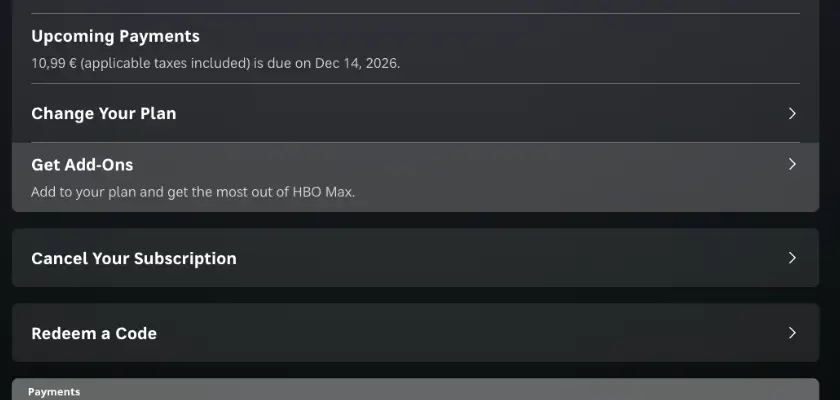
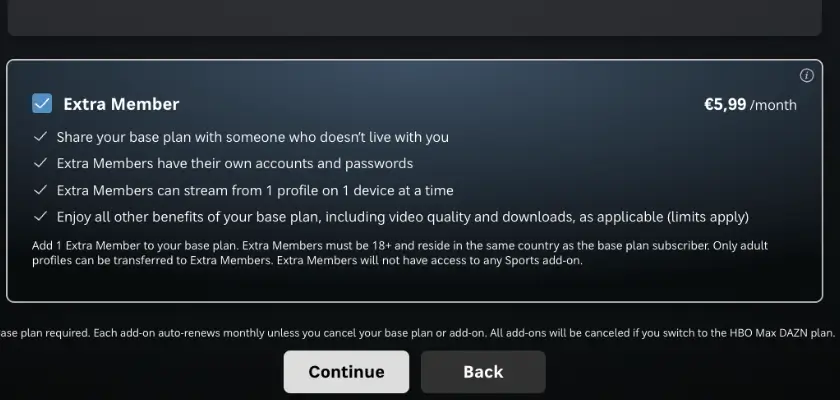
The option is now active on your primary subscription.
It renews automatically until canceled. The surcharge continues to be billed even when the space is not occupied.
4. Invite your co-subscriber from HBO Max
Once the option is enabled:
- Open HBOMax.com/account.
- Select " Manage Additional Subscribers."
- Click " Send an Invitation."
- Enter your co-subscriber's first name and email address.
- Choose to create a new profile or transfer an existing adult profile.
- Send the invitation.
The co-subscriber receives an email containing their activation link. HBO Max notifies you when the invitation is accepted.
What You Need to Know Before Sending an Invitation
- The additional subscriber must be at least 18 years old.
- Owner s must be in the country where they subscribed to HBO Max at the time of activation.
- Only one additional subscriber spot is available per subscription.
- The invitation link expires after 7 days.
An expired invitation can be resent from the additional subscribers management section.
How do I join an HBO Max group on Spliiit ?
If you don't have an HBO Max subscription, you can look for a spot offered by another user.
Here are the steps:
- Log in to the marketplace at Spliiit.
- Look for HBO Max among the available subscriptions.
- Choose an offer and submit your request.
- Please wait for the Owner to be approved.
- Please provide the email address where you would like to receive the invitation.
- Open the message sent by HBO Max.
- Click " Accept Invitation."
- Create your HBO Max account using your email address and personal password.
The email address used to create the additional account must not already be associated with an HBO Max account.
The link you received by email expires after 7 days. If it is no longer valid, ask Owner to resend the invitation.
Once your account is activated, you can enjoy your personal HBO Max access without using the login credentials from Owner.
To learn about other available services, check out our guide to sharing Movies & TV Shows subscriptions.
What does an additional HBO Max subscriber get?
The additional subscriber doesn't simply inherit a profile from Owner. They have their own account and their own login credentials.
- Feature|Additional Subscriber Access
- HBO Max Account | Personal Account
- Password|Personal Password
- Profile|1 profile
- Simultaneous Playback | 1 device at a time
- Compatible Devices|TV, computer, smartphone, tablet
- Video Quality | Based on the main plan
- History and My List | Saved in the event of a profile transfer
- Recommendations|Personalized
- Sports Content | Not Available
- Minimum age|18 years old
- Country of Activation | Same country as the account holder
The additional subscriber enjoys the features of the main plan. For example, a Premium plan may provide access to content available in 4K Ultra HD on compatible devices.
⚠️ The additional subscriber can watch HBO Max on the device of their choice, but only on one screen at a time.
How do I keep my old HBO Max profile?
You can transfer an existing adult profile to an additional subscriber account.
This feature allows you to save:
- Viewing history.
- My personal list: My List.
- Recommendations.
- The profile avatar.
- Preferences and settings.
- The profile's PIN.
When sending an invitation, the " Owner " can select an existing adult profile from their HBO Max account.
It is also possible to transfer a profile from another active HBO Max account at a later time.
How do I transfer an existing profile?
To transfer a profile to an additional account that has already been created:
- Sign in on a computer to the HBO Max account that contains the profile.
- Select " Manage Profiles."
- Select the adult profile you want to transfer.
- Click " Transfer Profile," then click " Get Started."
- Select " Existing Account."
- Sign in to the additional subscriber account.
- Confirm the transfer.
The account containing the original profile must have an active subscription.
The transfer creates a copy of the profile on the additional account. The original profile remains available on the old account and can be deleted later.
Which profiles can be transferred?
Not all profiles are eligible.
- Only adult profiles can be transferred.
- Children's profiles are not transferable.
- Both accounts must be from the same country.
- An additional subscriber account can contain only one profile.
If a profile already exists on the additional account, HBO Max will ask you to replace it to complete the transfer.
This process allows you to retain the history and preferences of an existing profile without having to start from scratch.
Can you share your HBO Max account with someone else?
Yes, you can share HBO Max with someone outside your household using the "Additional Subscriber" option.
The main account is still intended for people living in the same household. To invite someone who lives at a different address, the " Owner " must use the option provided by HBO Max.
The additional subscriber will then have their own account, with their own login credentials.
The account holder and the secondary subscriber must comply with the terms of service, including the minimum age requirement and the country of activation.
An additional standard profile is not the same as an additional subscriber.
The presence of multiple profiles or multiple simultaneous screens does not automatically allow for the sharing of login credentials across different residences.
For a Spliiit co-subscriber, use the official invitation sent by HBO Max.
As with Netflix account sharing, HBO Max plans to offer a specific option for users living in different households.
New HBO Max Sharing Policy: What's Really Changing
No need to:
- Share the password for the Owner.
- Use the main account.
- Share profiles and preferences.
- Request new login credentials at Owner.
Each co-subscriber has their own HBO Max account. The Owner retains their primary subscription and manages the additional seat.
How do I manage or stop HBO Max account sharing?
The account holder can manage the seat through their HBO Max account. They can resend an invitation, replace a subscriber, or cancel the option.
- Action|Consequence
- Resend an invitation | A new link is sent to the co-subscriber
- Cancel an invitation | The previous link becomes inactive
- Remove an additional subscriber | The user immediately loses access
- Invite a new subscriber | A new person can take the spot
- Cancel the add-on | Access continues until the end of the billing period
- Cancel the primary subscription | The additional access will end when the primary subscription expires
Removing an additional subscriber and canceling the option are two different actions.
Deleting a user immediately revokes that user's access. The Owner can then invite a new person.
Canceling the option stops its renewal. Access remains available until the end of the period that has already been billed.
Also, be sure to update or stop the corresponding sharing on Spliiit when an HBO Max account is deleted or canceled.
If the Owner cancels their primary HBO Max subscription, the co-subscriber will also lose access when the subscription expires.
What should you do if HBO Max screen sharing isn't working?
Most issues stem from the message template, the email address, or the invitation.
- Problem|Possible Cause|Solution
- "Additional Subscriber" option not available | Subscription billed by a partner or ineligible plan | Check your HBO Max billing and account options
- Invitation not received | Incorrect address or message filtered | Check the address and your spam folder
- Link has expired | Invitation received more than 7 days ago | Request a new link from Owner
- Unable to create an account | This email address is already associated with HBO Max | Use a different email address
- Activation Denied | Country Different from the Account Holder's Country | Activate the Account in the Country Where It Was Opened
- Profile cannot be transferred | Child profile or accounts from different countries | Select an eligible adult profile
- Streaming Stopped on a Second Device | Normal Limit for the Additional Account | Stop Streaming on the Other Device
- Sports content unavailable | Additional feature restriction | Use a personal subscription that supports sports
- Additional account deleted | Access revoked by Owner| Contact Owner at Spliiit
If the issue is directly related to your account or invitation, please visit the HBO Max Help Center.
If your session is locked on a second device, make sure no other device is already using your account.
For issues regarding cost-sharing or the relationship between Owner and a co-subscriber, please use the " Spliiit " messages or contact our customer service department.
Do you have a compatible HBO Max subscription? Offer your extra subscriber spot on Spliiit to split the cost and reduce your monthly expenses.
Frequently Asked Questions About HBO Max Account Sharing
Can you share HBO Max with someone who doesn't live in your household?
Yes, using the "Additional Subscriber" option. The primary subscriber must have a compatible subscription billed directly by HBO Max. The additional subscriber must be at least 18 years old and located in the country where the subscription was purchased at the time of activation.
How many people can you add to HBO Max?
Each eligible primary subscription can include one additional subscriber. This option is available for a fee.
Does the co-subscriber receive the password for Owner ?
No, they receive an invitation and then create their own HBO Max account with a personal password. The Owner login credentials are not shared.
Can you use HBO Max on multiple devices?
The additional subscriber can log in on various compatible devices, but can only watch HBO Max on one device at a time.
Who pays for the Additional Subscriber option?
HBO Max bills the co- Owner r for the main subscription. On Spliiit, the co- r pays their share directly on the platform.
Can you keep your old HBO Max profile?
Yes, you can transfer an eligible adult profile to retrieve your viewing history, recommendations, and "My List." The transfer creates a copy of the profile on the new account.
Can a Child profile be transferred?
No, only adult profiles can be transferred to an additional subscriber account.
Can you watch sports with an additional account?
No. Additional subscribers do not have access to sports content or the Sports option.
Can you add an additional subscriber to an HBO Max subscription purchased through Apple or Google?
No. This option is available only to eligible subscriptions billed directly by HBO Max, excluding bundles and partner subscriptions.
How long is an HBO Max invitation valid?
The invitation link is valid for 7 days. The Owner can send a new link from the "Manage Additional Subscribers" section.
Can a co-subscriber be replaced?
Yes. The Owner can remove an additional subscriber and invite someone else from their HBO Max account. The previous user immediately loses access.
What happens to my access if Owner cancels HBO Max?
The additional subscriber account also loses access when the primary subscription expires.
How much does an HBO Max subscription cost on Spliiit ?
The price depends on the HBO Max plan you choose and your country. Check out the available plans at Spliiit to find out the monthly fee.
Official sources
- HBO Max — Add and Manage an Additional Subscriber (Spain)
- HBO Max — Manage Additional Subscribers (Netherlands)
- HBO Max — Transfer a Profile
- HBO Max — Account Sharing Rules
See also on Spliiit
Frequently asked questions
Mubi