
Livraison


.png)
Comment partager son abonnement Amazon Prime ?
Temps de lecture : 3 minutes
Article écrit par
Marine
Mis à jour le
6/8/2026
Partager sur

Le partage de ce service se fait par invitation. Aucun partage d'identifiants n'est nécessaire.
Important :
- Amazon Prime Etudiants et Business ne peuvent pas être partagés.
- Votre co-abonné.e n’aura pas accès à vos informations personnelles comme l'historique des achats ou votre numéro de carte bancaire. Chaque compte est indépendant.
- Votre co-abonné.e n’aura pas accès aux mêmes avantages que le propriétaire. Ces avantages dépendent du pays dans lequel vous vous trouvez.
La méthode de partage pour le propriétaire 👑
Important ! Le partage de cet abonnement ne peut pas se faire via l'application.
Pour cela, connectez-vous à votre compte Amazon.
Une fois connecté, cliquez sur votre compte > Votre compte Amazon Prime (voir image ci-dessous)

En bas de la page, cliquez sur "Partagez vos avantages Amazon Prime". Vous devriez voir apparaître ce nouveau champ :
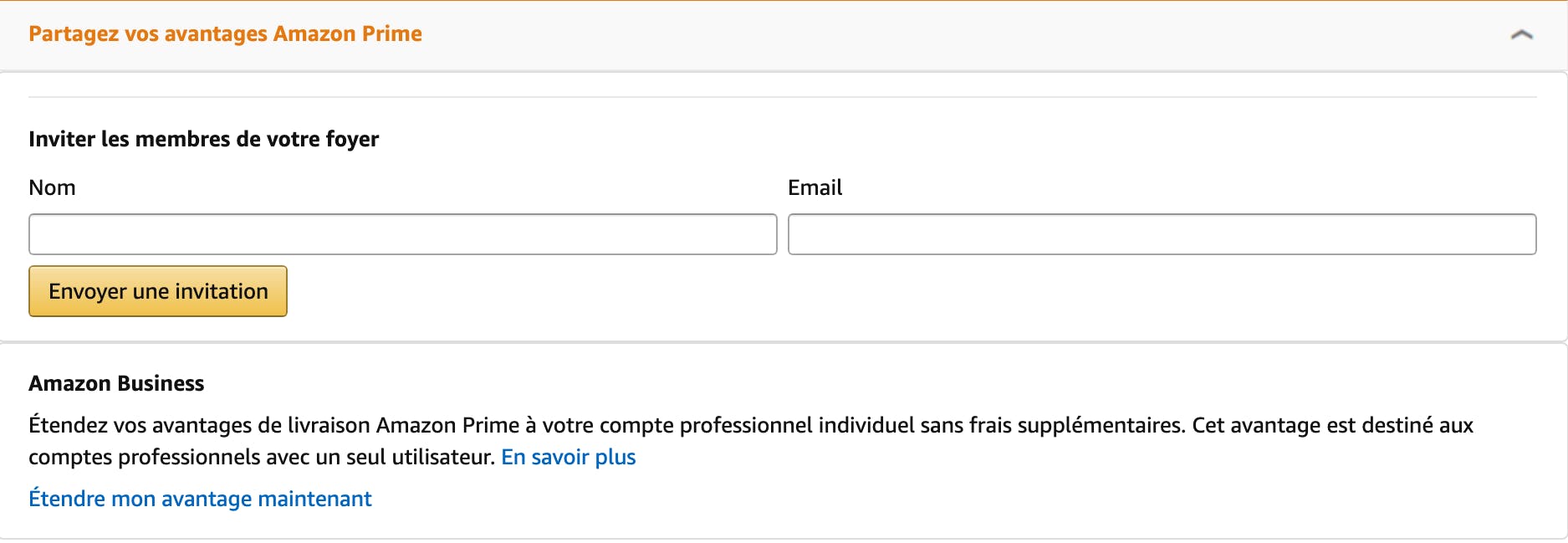
Entrez le nom et l'adresse mail de la personne avec qui vous souhaitez partager vos avantages.
Enfin, cliquez sur Envoyez une invitation.
La méthode de partage pour le/la co-abonné.e 👤
- Vous venez de recevoir un mail suite à l'action du propriétaire.
- Cliquez sur le lien contenu dans le mail et connectez-vous à votre compte Amazon.
N.B : Vous devez obligatoirement avoir un compte Amazon. Si vous n'en n'avez pas, créez votre compte.
Profitez désormais des nombreux avantages de votre compte Amazon Prime !
Foire aux questions
Netflix
% Divisez vos factures par 2 ou 3





Paiement 100% sécurisé

Partagez et économisez

+300 abonnements disponibles
Plus de 300 abonnements
partageables











D'autres articles pourraient vous intéresser
No items found.



